

You Vibe Coded a Thing. Now What?
Don't push your prototype to production on auto-pilot

I built my app in Google AI Studio. The build process was genuinely smooth. It takes direction well, doesn’t require a ton of back and forth to get somewhere real, and honestly I’ve had a much more productive time with it than Lovable for anything technically complex. I like Google AI Studio’s balance of technical depth, visual previews, and design capabilities.
But when I was ready to move toward production, I switched to Claude Code, because Gemini is really agreeable in a way that’s not useful when you need critical feedback. Ask it to review something and it mostly... agrees with you. Ask Claude the same question and it will actually provide criticism. When you’re going to vibe code into production and you’re not an engineer, you need to have a lot of trust in your tool (not blind trust, but trust). It’s another reason trying different tools is important so you can figure out which you vibe with best (see what I did there?)
So far the stack I ended up with is: prototype in Google AI Studio, production review, infrastructure, and setup guide in Claude Code, landing page in Lovable, hosting on Cloudflare, Supabase for access management, and GitHub connecting everything. I’m still not fully done. The “I shipped an app in 30 seconds” thing is real, but only if you don’t care about security, governance, user experience, long-term viability, etc. Vibe coding a product is best done if you understand how products are built without AI so you can fill in the blanks. AI will find the most efficient path, it won’t default to the most thorough path.
Here’s what I’d tell you to watch for.
Understand why before you commit anything.
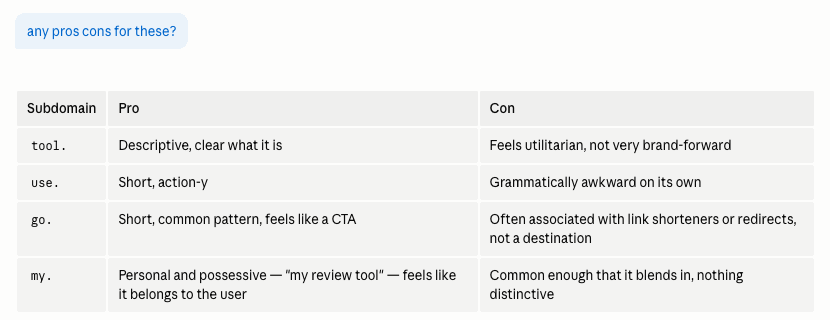
Claude Code will explain its reasoning, not just the steps. Whenever I was deciding between options, I asked for pros and cons. Sometimes I would then ask about a specific option or between two with some additional context for the decision making and get more guidance. That matters a lot when you don’t have an engineering background, because if a tool is just handing you a list of things to do without context, you’re making decisions you don’t actually understand about infrastructure that’s going to matter later.
This was my first use of Cloudflare and Claude Code was really helpful to take me step by step so I could not just get my app up, but also understand the structure and usage options. I also had to take a lot of screenshots because the UIs change and the AI doesn’t always have the latest version of what you’re actually seeing on screen. This is an area that AI really shines — Claude Code had enough context of Cloudflare to adjust the steps and direction in the updated UI, even if it didn’t match Claude’s internal references.
It’s not about trying to become an engineer, it’s about understanding what you’re building and how you’re structuring it enough to be intentional. Because something will break later, or you’ll need to change something, or someone will ask you why it’s structured the way it is. “Claude told me to” is not a log.
If the tool you’re using is giving you step-by-step directions with no explanation of what those steps do, press pause. Either ask it for more context or get a different tool.
Set up staging. You need it.
Staging lets you experiment with changes before committing to them — this is critical in AI. However, when it came up, Claude Code’s first suggestion was basically: you’re early beta, you don’t need it. And I said no — I want the staging environment, because this isn’t a set it and forget it, this is a tool that I’ll keep tinkering with and improving.
The AI will optimize for the fastest path. Sometimes that’s right. This wasn’t.
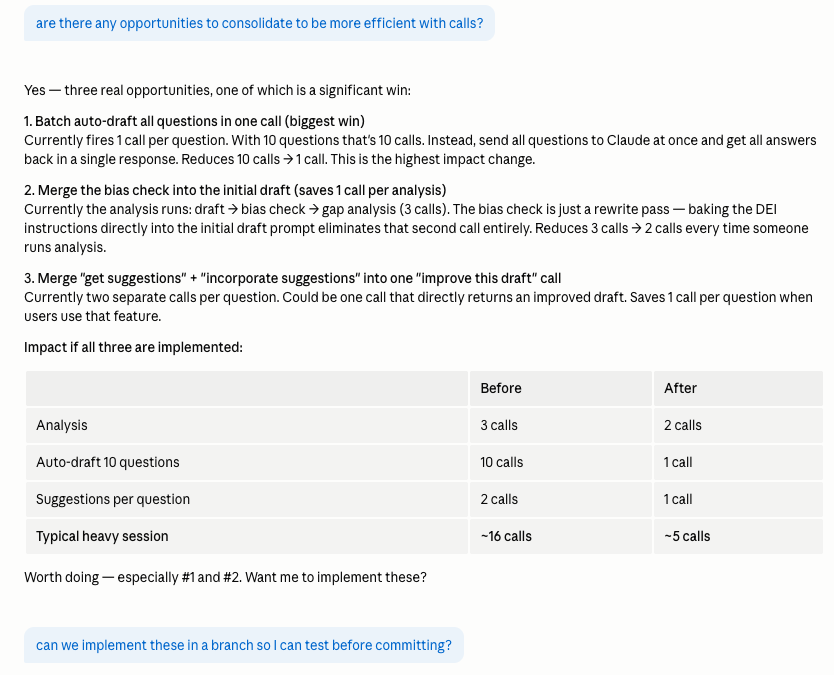
Staging saved me pretty quickly after I set it up. When I consolidated some API calls to cut costs, it changed the quality of what the app was producing in a way I wasn’t expecting — significantly. If I’d pushed that straight to production with real beta users in there, I would have broken the main thing the product does, with no clean way back. Staging let me catch it, show Claude Code the before and after, and find efficiency improvements that didn’t tank the quality.
Set up staging.
Ask “what else?” when you think you’re done.
I got through a list of setup tasks and asked Claude Code: any other settings in Cloudflare we should look at?
It surfaced email routing (so people could actually reach me, and so I’d get notifications when people tried to sign up for the beta), web analytics, and rate limiting. Rate limiting is not a nice-to-have — it’s how you protect yourself from someone running up your API costs, whether intentionally or just by hammering the tool.
It also organized the recommendations by priority — high value and easy to set up, important for cost protection, nice to have later. Because not everything on its list made sense for where I was based on the context Claude Code had, but I still had to look at it and decide what was actually relevant. Remember, the context you have as a builder is always going to be much broader than what your AI tool has.
Don’t assume that running through a checklist means you’ve covered everything. Ask what you might be missing. The information is usually there.
Track model performance, not just user behavior.
When I started thinking about analytics, I went straight to user behavior — how people use the tool, where they drop off. That’s the obvious one.
But Claude Code flagged a second category I hadn’t asked for yet: model performance. Cost per request, error rates, inputs and outputs. If you’re building an AI tool, your model is part of your product, and it can get expensive or start degrading in ways that won’t show up in user behavior data until it’s already a problem.
It recommended PostHog for user behavior and Helicon for model performance because they’d integrate with what I’d already built, meet the tracking needs I gave it, and because I’d told it I was trying to keep costs down. The more specific you are about your actual constraints when you’re working with these tools, not just your goals, the better the recommendations get.
Your Terms of Use needs a date and a version field.
This one I caught myself when I was reviewing what Lovable produced for the sign-up flow.
If you have a Terms of Use (and if you’re building an AI tool, you need one), you need two things: a date at the top, because terms change, and a field in your database capturing which version of the terms each user actually accepted.
You will most likely update your terms of use at some point and if something becomes a question — legally, for compliance, whatever — you need to know who accepted what and when. Best practice is to get all users to accept the terms of use anytime it is updated. Claude Code wrote the SQL to add that field and walked me through running it in Supabase. Easy fix for a critical step.
Check yours. Add the date. Add the version field.
Tell your tool what the user flow is. It isn’t omnipotent.
When I set up my domain, Claude Code put my app at the main domain. Which makes sense — that’s what we started with. It didn’t know I had a landing page.
I wanted a landing page first, then a sign-up gate, then the tool. That’s what most of us want. The AI doesn’t assume it.
Not hard to fix, but I see a lot of sites that give little thought to their URL structures. Take the time to think about what you’re building now and potentially in the future and think through your user flow. If you haven’t given your tool a clear picture of what you want the user flow to look like — even just described in plain language — it’s going to make its own call. Give it the map.
Single Source Files.
I used Lovable to create my landing page. I gave it screenshots of my app design, it got close to what I needed, and it connects natively to GitHub and Cloudflare, which Claude Code pointed out immediately. Getting that landing page into the stack was straightforward in a way that the main app wasn’t. I’m sure I could have built with Google AI Studio, but it was a chance to spend some more time in Lovable and was a good fit for what the tool does.
However, using two different tools does mean you need someone reviewing the seams. Claude Code caught broken buttons in the Lovable build that Lovable hadn’t wired up. It also helped me eliminate duplicate items like my FAQ and Terms of Use and get to source files that could be referenced in multiple places. This is a good one to think through — we often post the same thing in multiple places, it’s ideal to find opportunities to have a single source so everything stays updated, and it’s critical for things like your Terms of Use.
Honestly, the “30 seconds to production” framing is doing a lot of people a disservice. You can get something up fast. Getting something up that you’re actually comfortable having people use — with cost protection, security basics, a staging environment, proper terms tracking — takes longer. Not forever. But longer.
I intentionally did more of this manually than I had to. I wanted to understand the pieces, not just have them done. I don’t regret that — my understanding of how all of this fits together is a lot better than it was — but I want to be upfront that there are probably faster ways if that’s what you’re optimizing for. It’s always a choose-your-own-adventure with tradeoffs. For me, the technical depth is worth the extra time, and feeling that I am crafting something of value and not a quick fix is important to me.
Last, but not least, I created a handy one-pager with a checklist and prompts to snag if you found this useful:
