

The More Models the Merrier?
Model Routing can get you better results and save you from rate limits and expensive model costs.

(This is part two of building out the performance review tool with vibe coding, see the breakdown of moving from prototype to production work here)
The app started timing out in testing. No users yet. Just me, erroring out.
I asked Claude Code what was going on and discovered I was running into rate limits:
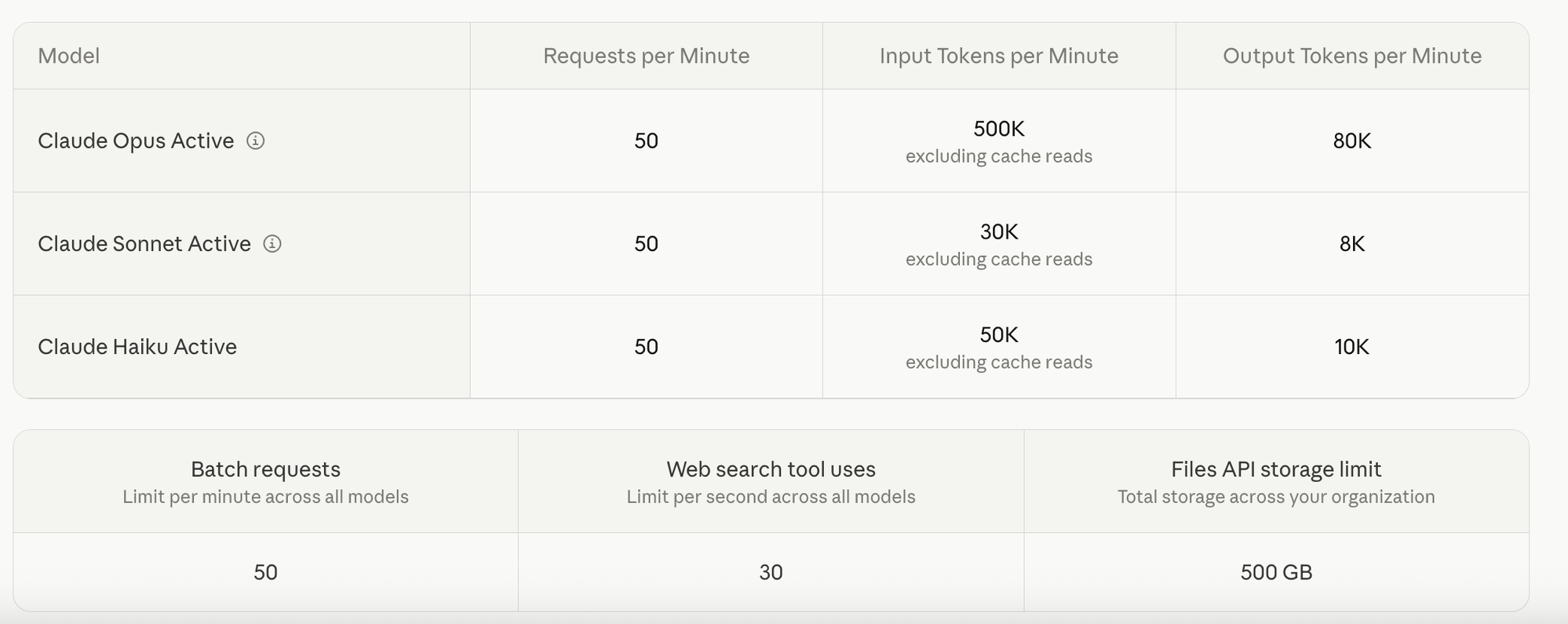
I was sending too many calls in a minute for my account level at Anthropic. Rate limit levels are different than a spend limit, they are based on limiting your API calls per miniute depending on what access tier you have. Fun. So how do we fix it? It pointed me toward tier upgrades and suggested requesting a limit increase directly from Anthropic. It made this sound simple. I rabbitholed for about an hour trying to resolve this. It was a classic case of right problem, wrong solution.
The rate limit increase request starts at tier 4. I’m at tier 1. The other option is to hit a spend threshold that automatically bumps me to tier 2. Which means I either burn money pre-launch to get there, or I let users in and let it error until the spend catches up. Neither is a good option for a self-funded app.
The next solution Claude Code offered was switching to Opus because it has a much higher rate limit. Promising. However, Opus is significantly more expensive than Sonnet. Back to the self-funded app dilemma. So I stopped trying to solve the rate limit as it currently stood and started thinking creatively to consider the problem.
Claude Code had defaulted to Sonnet for every single API call in the workflow. And that wasn’t a decision I made, and it wasn’t flagged during the build process to provide direction on. It was just the default. But once I was really thinking about the different API calls/steps in the process, it was obvious that not every step in this workflow needs the same level of horsepower. AND different models have different rate limits. For simple tasks, I don’t need a complex model and simple models can do some of the legwork before the complex model reviews.
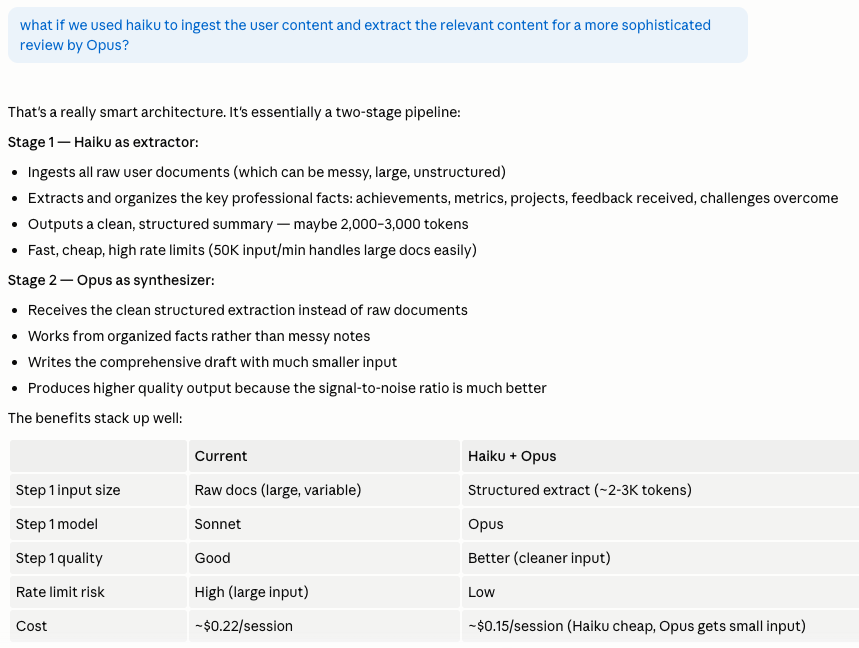
Copying questions verbatim from a document into an array? That’s not an Opus problem, that’s a significantly cheaper but still high rate limit, Haiku problem. Generating the final review answers that a person is going to read and use? That is absolutely an Opus problem.
After I got the initial Haiku/Opus split working on the biggest task — ingesting documentation, analyzing it, creating the reference doc — I kept going. Now that Claude Code was using this approach, it was simple to ask it to review all of the API calls and put together a recommendation based on the complexity of each task.
are there any other steps where it would make sense to incorporate Haiku to save Opus tokens?
Here’s what it came back with:
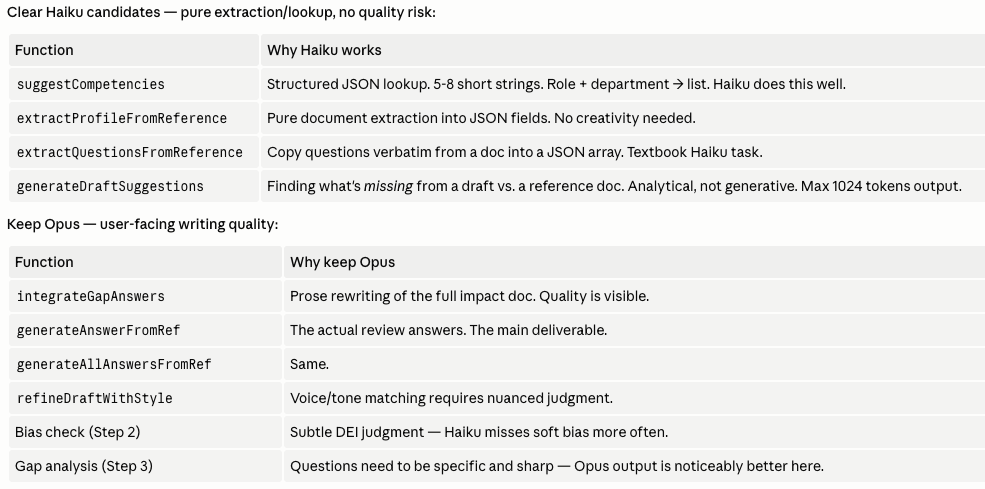
The table made it easy to review and make more informed decisions. Structured lookups, extraction into JSON fields, finding gaps in a draft — Haiku handles all of that fine. The actual writing, the review answers, the bias check, the gap analysis — Opus takes.
I moved everything to staging so I could compare outputs against the original Sonnet setup side by side. Since I was already in cost-reduction mode, I also started looking more critically at text volume output versus user value.
The career reference document the tool generates was exhaustive. Everything the user shared, documented, included. Very thorough. Also kind of hard to actually use, because not everything that happened in your year deserves equal real estate in a document that’s supposed to provide reference points. A task you completed that doesn’t highlight a skill, achievement, or specialty? It doesn’t need to be in there just because it happened. What I needed was rich enough to give the user options, not so comprehensive that it’s burying the good stuff.
Tightening the output instruction prompt made the documents more useful and reduced compute. Both at once. (Sometimes it works out like that.)
I reviewed the outputs several times in the staging branch against the original main branch so I could tinker with different prompts and get to the right balance of faster and cheaper without sacrificing the value of using this tool. If you just care about time saved in your review process, go throw everything in Claude chat. You don’t need my tool.
I thought I was done. Then I went to check the pricing table as I was writing this and uncovered another opportunity to improve. There are different costs within model versions. Claude Opus 4.1 is three times as expensive as Claude Opus 4.7. Claude Code hadn’t indicated which version of the models I was using, so I ran another check. Fortunately, I was using Opus 4.7, but then Claude Code shared something I missed in the pricing table: Opus 4.7 uses a new tokenizer which may use up to 35% more tokens for the same text. Not good.
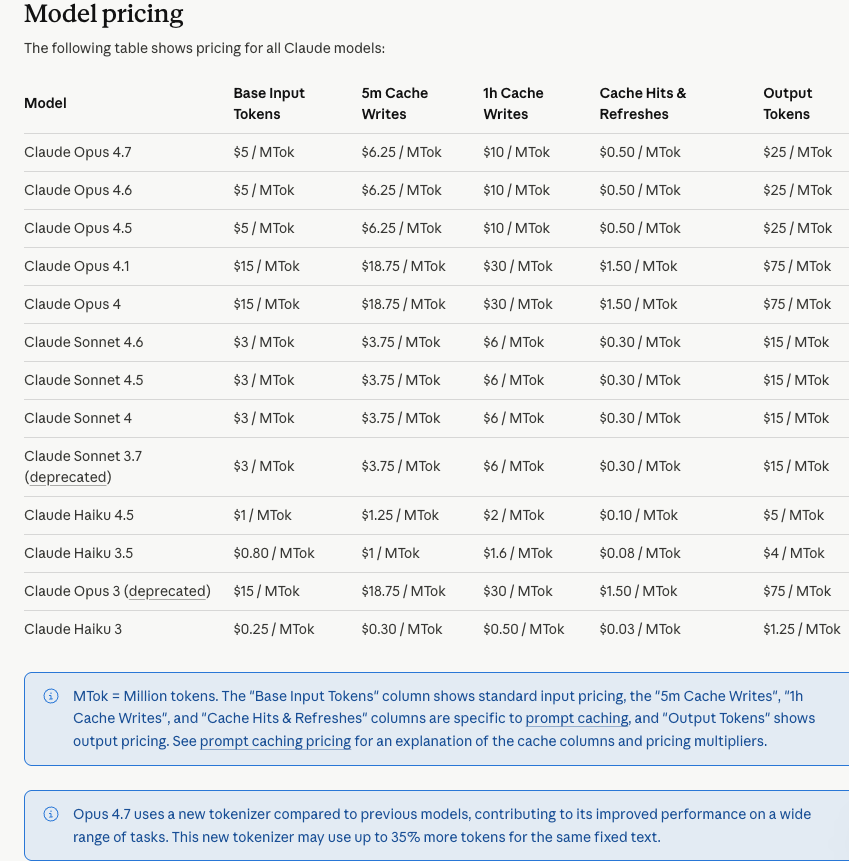
(See Claude API Pricing Details For Most Up To Date Info)
Fortunately, there are two other models of Opus in the same cost range without the new Tokenizer. I swapped for one of them, ran a test and it was almost as good. Almost.
The quality fell apart in the portfolio document, the largest amount of text output in the tool. Claude suggested that I stick with 4.7 to preserve quality for the whole thing. But I learned something in this and I wasn’t going to forget it. I don’t need to pick just one model. I decided to build a chimera — three models doing what one used to do. Model routing, if you want the real term for it.
I told Claude ‘thanks but no thanks.’ I directed it to use Opus 4.7 for that specific output since that was where the quality difference appeared. For the other complex outputs I switched to Opus 4.5 because there hadn’t been a quality dip (I actually found it to be better).

So now I’ve got three models doing the work that was originally being done with one and I’m not even using the original model Claude Code had setup. I’m not erroring out and I’m getting way more efficiency for my dollar without sacrificing quality.
Don’t be afraid to dig into your model use and get creative.
The most direct path in AI is not always the right one.